See how code hangs together
The architecture, flows and connections of C, C++ and Python code: what a class is made of
and what it touches, how control flows from main, which modules lean on which, and where the
cycles, duplicates and dead code are. For reviewing code you didn't write yourself, especially code an
assistant wrote. Free, open source, all on your computer.
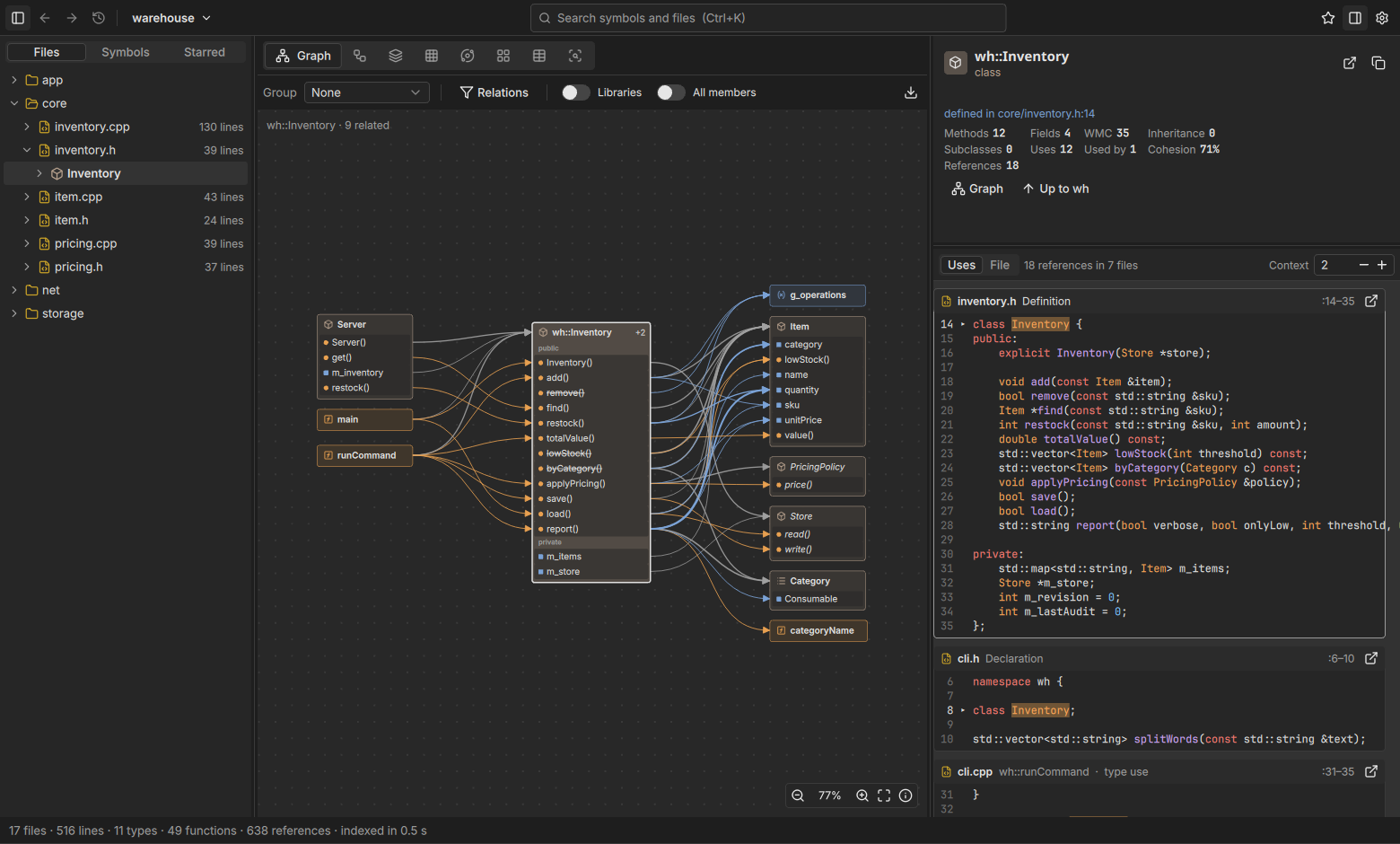
Features
clang does the understanding: every translation unit is parsed exactly as your build compiles it. Unravel keeps every declaration, call, include, inheritance and override, and shows them in views taken from the tools that did this best.
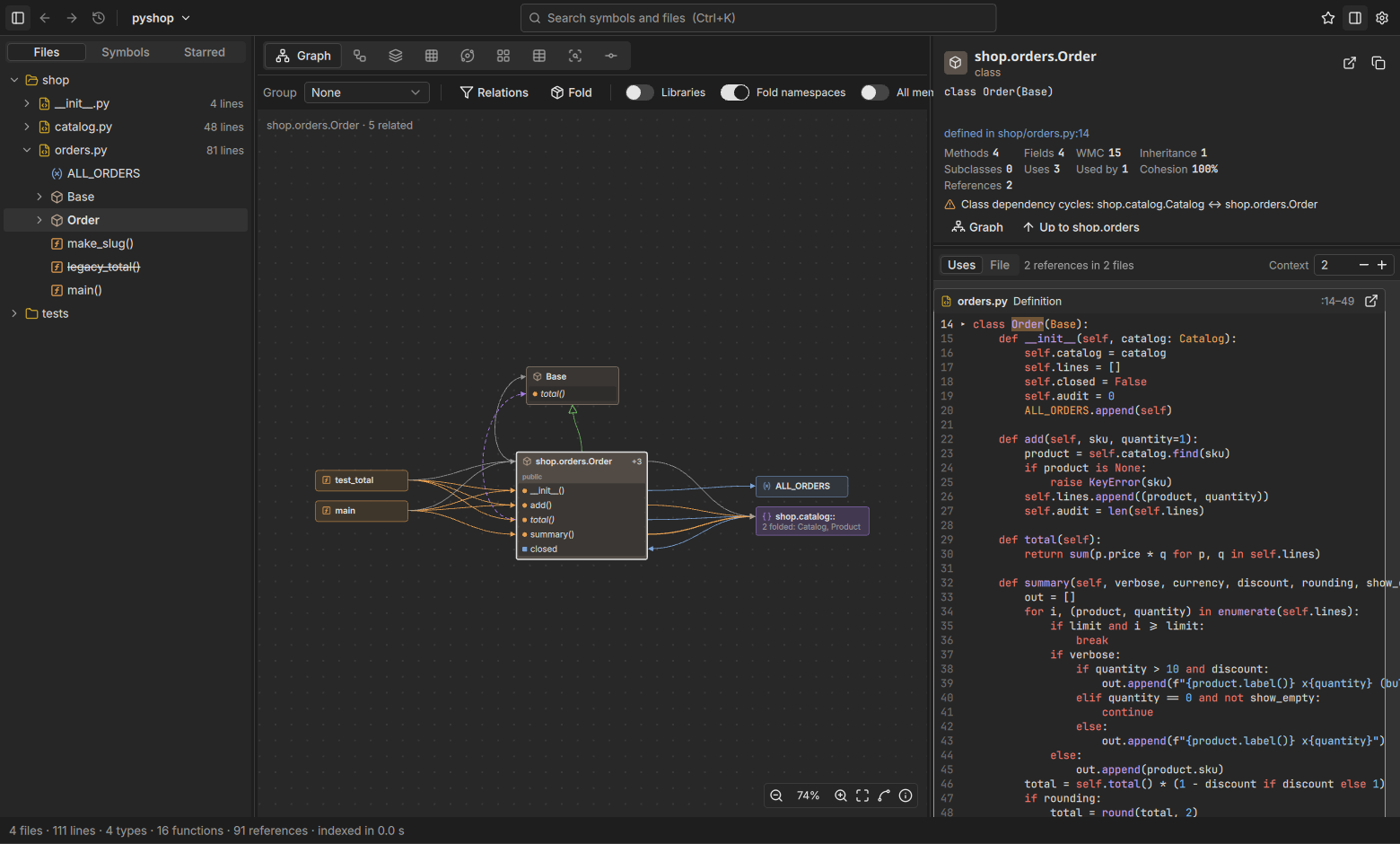
Graph
A symbol in the middle, its members by access, what uses it on the left, what it uses on the right, bases above and subclasses below. Click an edge for the references behind it.
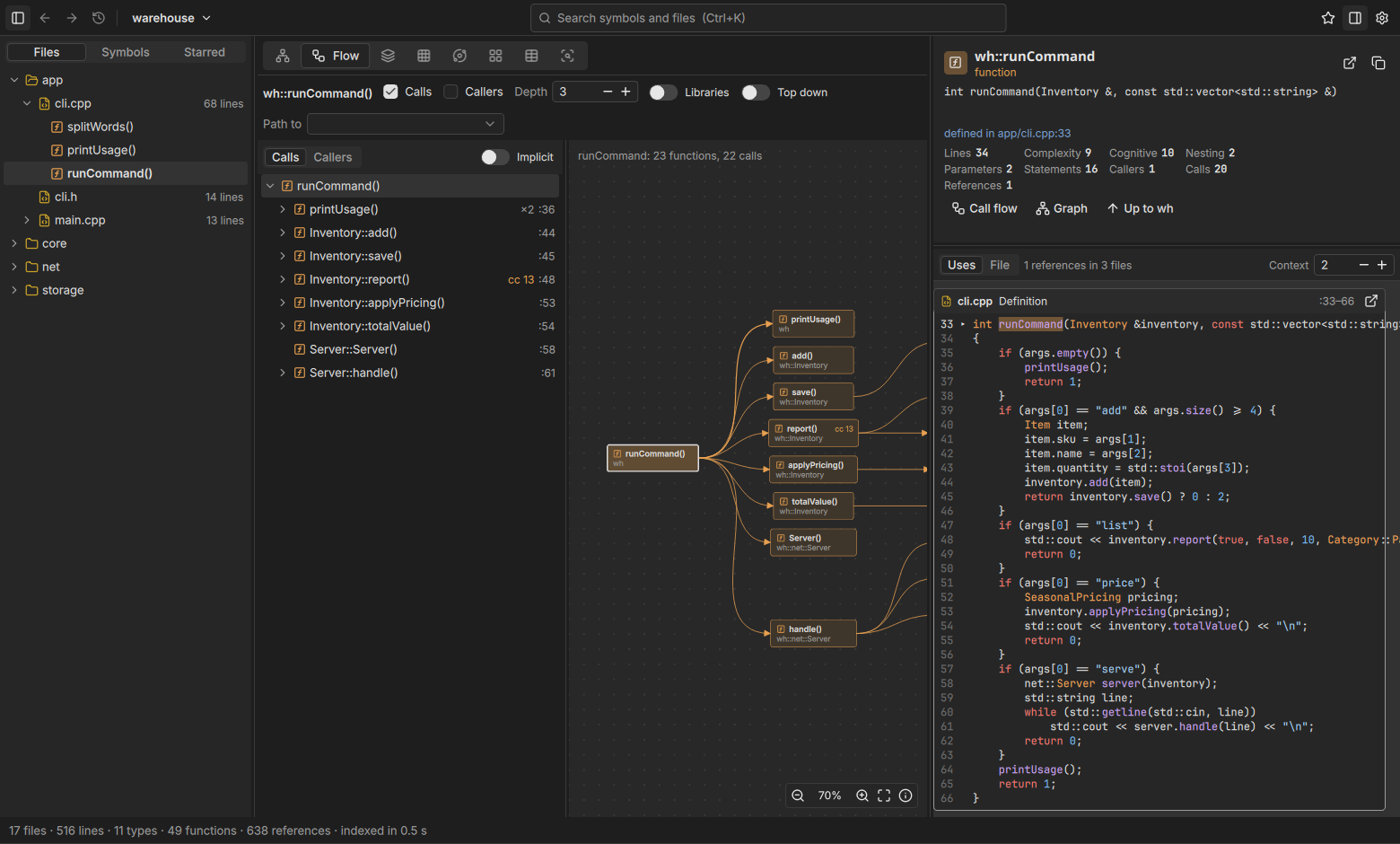
Flow
A call tree in the order of the code, with virtual dispatch to every override and recursion marked, and every call path from one function to another.
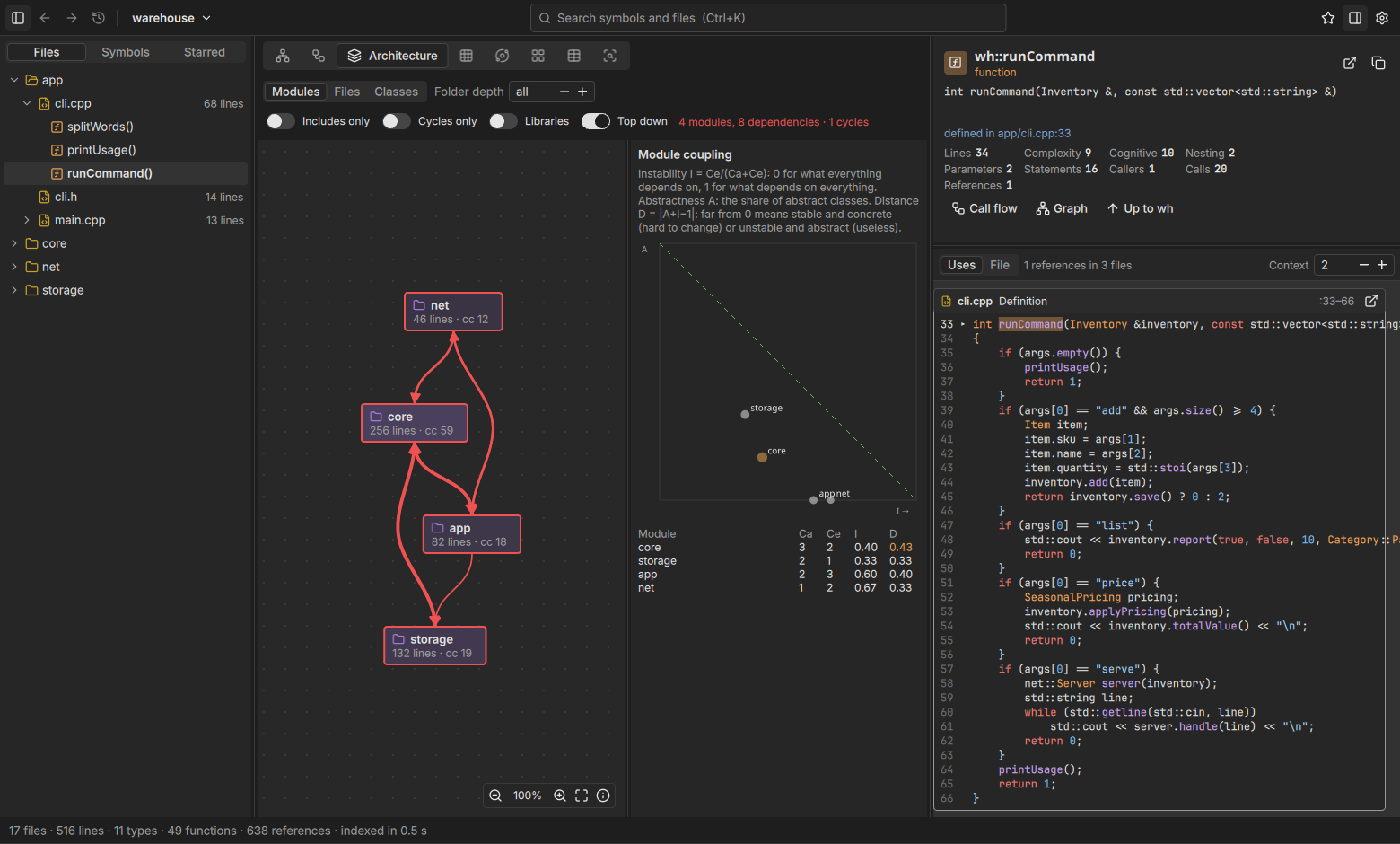
Architecture
Modules, files or classes layered so dependencies sit below what uses them, cycles in red, with Robert C. Martin's coupling metrics and the main-sequence chart.
Edge bundles and matrices
Holten's hierarchical edge bundles and a dependency matrix of folders, files and their symbols, as in SolidSX and CPPVis.
Treemap and metrics
Area by lines, colour by complexity, callers, nesting or findings; a sortable table of every function's and class's numbers.
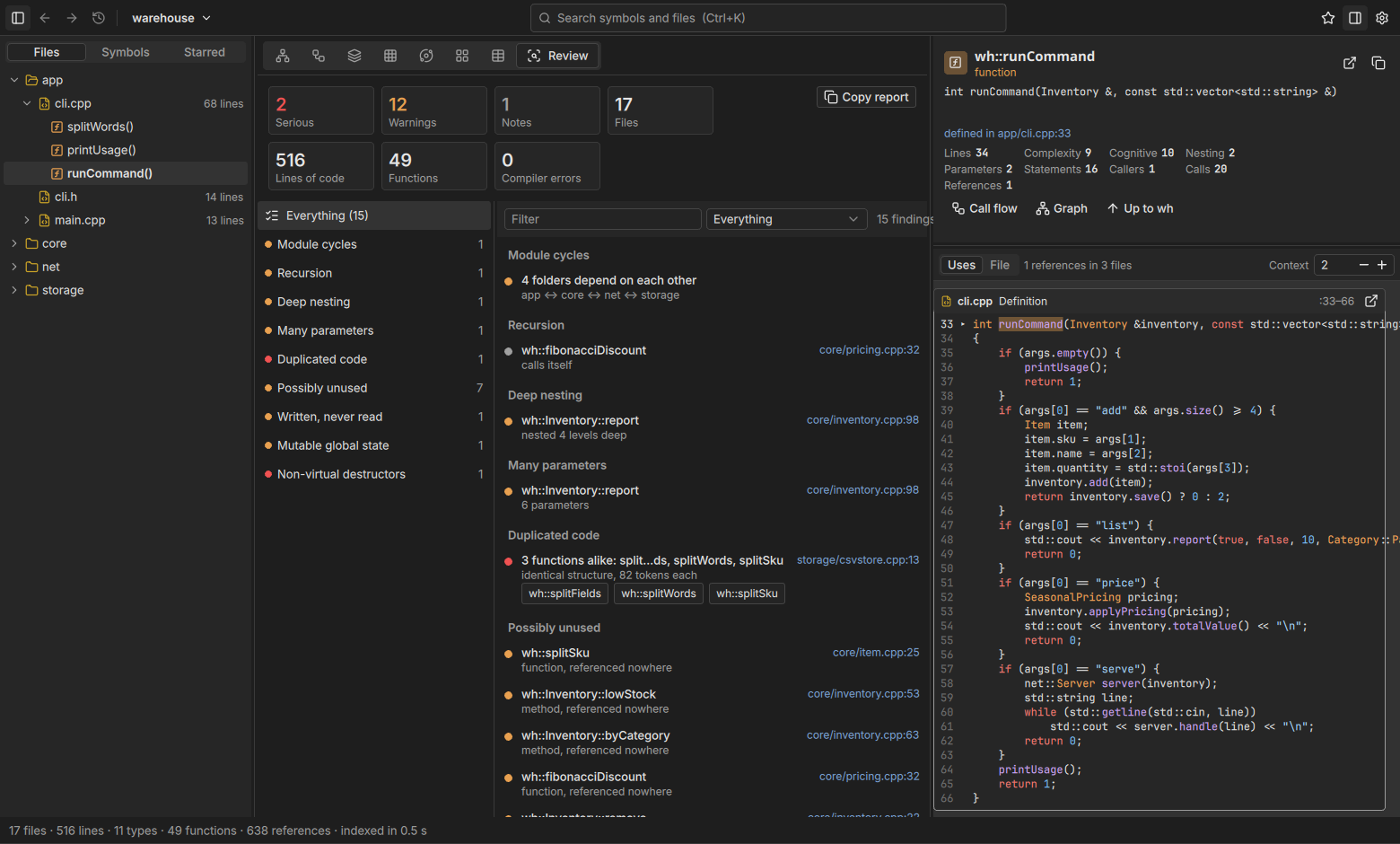
Review
Include and import cycles, duplicated code, possibly unused code, fields written and never read, global state, non-virtual destructors, long and tangled functions. Exported as Markdown.
Changes
Pick commits and see only the classes and functions they touched, with what uses them and the findings in the change.
Folding
Third-party code, generated code or a subsystem you aren't reviewing folds into one node; other namespaces fold in the graph until you open them.
C, C++ and Python
Your compile_commands.json, or CMake asked for one, or flags guessed. Python through its own ast, nothing imported or run.
Follow the calls
From any function, the calls it makes in the order the code makes them, unfolding on demand, and beside it the same calls as a layered graph to any depth. Virtual calls fan out to every override.
The architecture as it is
Not the one in the design document: folders as modules, layered by what they use, with the cycles that keep them from being understood, built or reused on their own.
What to look at first
The review lists what tends to go wrong in generated code: the same function written twice, helpers nothing calls, state written and never read, functions with too many parameters or branches. Every finding links to its code.
Python too
Modules become namespaces with their classes, functions and fields; imports, inheritance and the calls
that can be resolved become edges, through self, super() and type annotations.
A mixed project gets both at once.
Download
For Windows, macOS and Linux. Each download brings its own clang.
The nightly is built every night from the newest code. Every version is on GitHub. To build it yourself you need Qt 6.9 or newer and libclang 17 or newer; see the README.
Installation
Step by step for your system. Unravel reads your code where it is and keeps its indexes in a cache folder of its own; it never changes a project.
Windows 10 and 11
Install
- Download the installer (
unravel-windows-x64-setup.exe) above and double-click it. - Windows says “Windows protected your PC”, because the program isn't digitally signed yet. Click More info, then Run anyway.
- Choose who to install for: only you (recommended, no administrator rights) or every user of the computer (asks for an administrator).
- The boxes Start menu entry and Create a desktop shortcut are ticked; untick what you don't want, then Install.
- Unravel starts at the end. Open a project folder or a
compile_commands.json.
clang needs the C++ standard library's headers, which come with Visual Studio or its free Build Tools (“Desktop development with C++”). With MinGW projects, their compilation database points clang at MinGW's.
Update and remove
Run the installer of the new version; it replaces the old one. To remove it: Windows Settings › Apps › Installed apps › Unravel › Uninstall.
Without installing: unzip the zip archive and start unravel.exe. unravel-cli.exe beside it writes the review from a terminal.
macOS (Apple silicon)
Unravel isn't notarised by Apple yet (that costs a yearly fee), so macOS blocks its first start. Once allowed, it starts normally from then on.
Install
- Download
unravel-macos.dmgabove and double-click it. - Drag Unravel from the window into the Applications folder, then eject the “Unravel” drive in the Finder's sidebar.
- Double-click Unravel in Applications. macOS says it can't be opened because Apple couldn't check it for malicious software. Click Done, not “Move to Bin”.
- Open System Settings › Privacy & Security and scroll down to Security, where it says “Unravel” was blocked. Click Open Anyway. The button shows only for a while after the attempt; if it's missing, repeat step 3.
- Confirm with your password or Touch ID and choose Open Anyway once more. From now on a double-click is enough.
The system's headers come from the Xcode command line tools: xcode-select --install if you don't have Xcode.
For the experienced: instead of steps 3 to 5, xattr -dr com.apple.quarantine /Applications/Unravel.app in the Terminal lifts the block for this app.
Linux
AppImage (any distribution)
- Download
unravel-linux-x64.AppImageand put it somewhere for good, for example~/Applications. - Make it executable: in the file manager under Properties › Permissions, or in a terminal with
chmod +x unravel-linux-x64.AppImage. - Double-click it, or start it with a project:
./unravel-linux-x64.AppImage path/to/project. If it mentions FUSE, add--appimage-extract-and-run, or take the.debon Debian and Ubuntu.
Debian and Ubuntu
sudo apt install ./unravel-linux-x64.deb installs it with an entry in the application menu and
unravel and unravel-cli on the path; a new version installs the same way. Remove it with sudo apt remove unravel.
The standard library's headers come with your compiler (g++ or clang), which a machine that builds the code has anyway.
Questions
What does Unravel cost?
Nothing. It is open source under the MIT license and free to use and pass on.
Does my code leave my computer?
No. Unravel parses it with the clang it brings, keeps the index in its cache folder and sends nothing anywhere. It runs git for the Changes view, cmake to get a compilation database and python3 to read Python files, all on your computer.
What does it need from my project?
Best a compile_commands.json (CMake with -DCMAKE_EXPORT_COMPILE_COMMANDS=ON, Meson, or bear -- make), so clang compiles every file as your build does. For a CMake project without one Unravel asks CMake; otherwise it guesses the include paths, and the review lists where the guess was wrong.
How big a project can it take?
Indexing runs on all cores and is kept, so the next start is instant. Qt's own QtCore, with its thousands of files, takes about a minute; the views stay fluid because everything is drawn on the GPU.
Is “possibly unused” safe to delete?
Not blindly. What clang can't see, Unravel can't: calls from QML, scripts, other programs, through function pointers stored at run time or behind #ifs the build doesn't take. In Python, anything reached through getattr or a decorator. It is a list to check.
Windows or macOS warns at the start. Is that dangerous?
The program isn't digitally signed (yet), so Windows SmartScreen warns and macOS blocks the first start. The installation guide shows how to start it anyway. The source code is public.
Something is missing or doesn't work.
Ideas and problems are welcome as an issue on GitHub.